Documentation
$ cat ./getting-started
Last updated: Apr 2026
Everything you need to get distinct-baguette running — from purchase to live trading on Polymarket. New here? Start with the technical overview.
01.Purchase the Bot Package
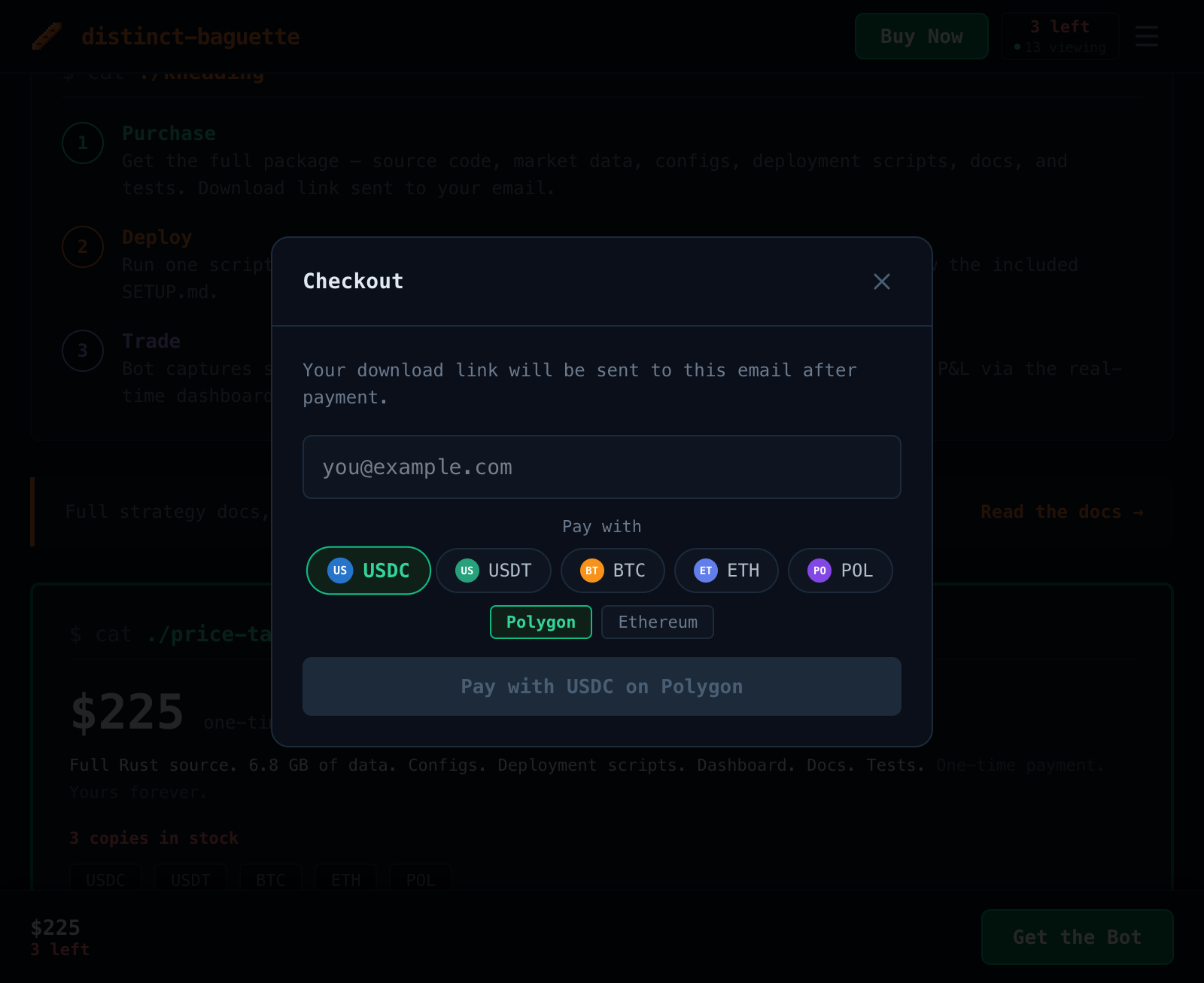
Click any "Get the Bot" button on the product page to open the checkout. Enter your email address and select your preferred cryptocurrency — we accept BTC, ETH, USDC, USDT, and POL:
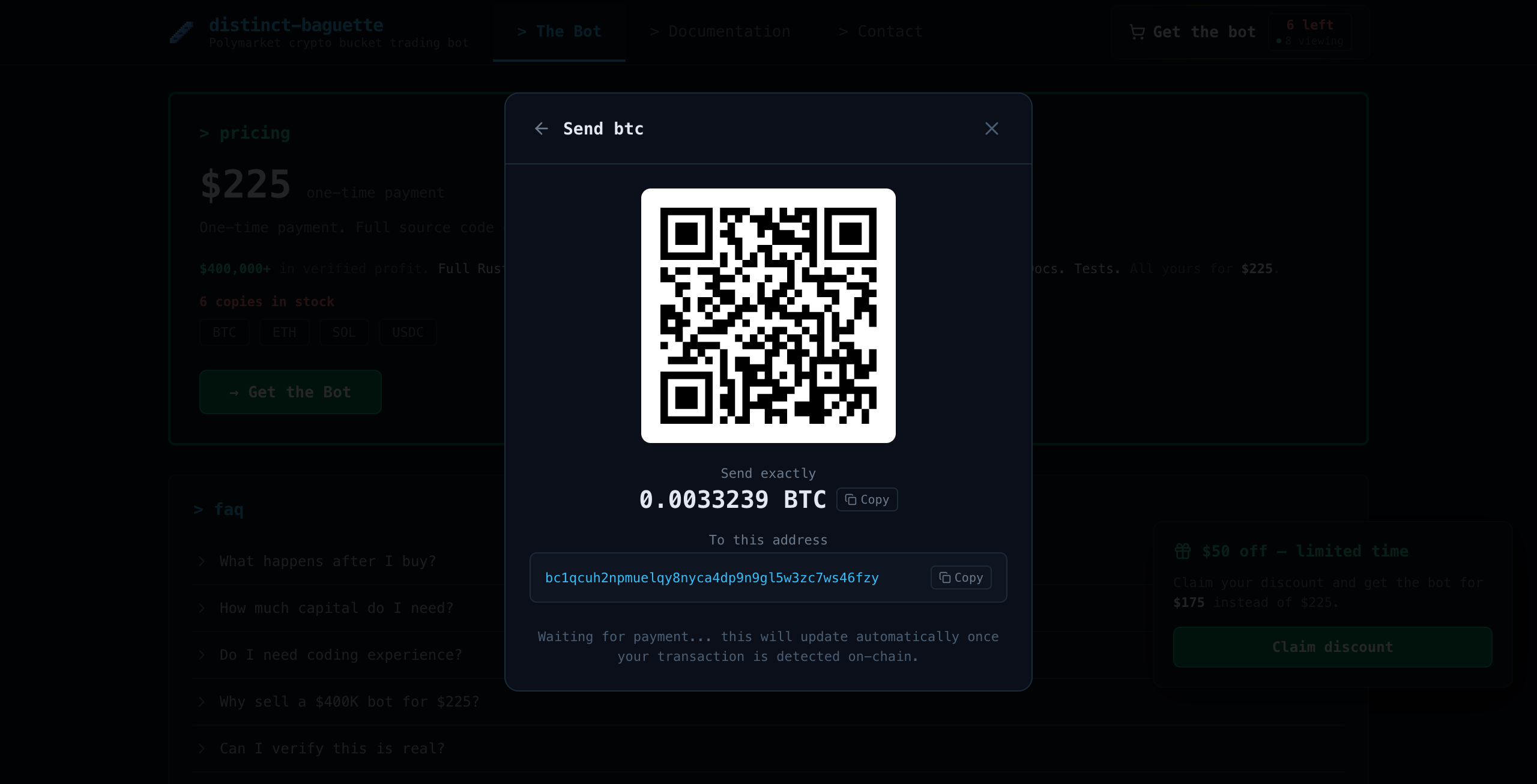
Send the exact amount to the provided wallet address. You can scan the QR code or copy the address:
⏱️ Payment Processing Time
Crypto payments can take up to 20 minutes to confirm on-chain. Once you've sent the payment, the checkout will automatically detect it. You'll receive a confirmation email with your download link.
02.Download Source Files
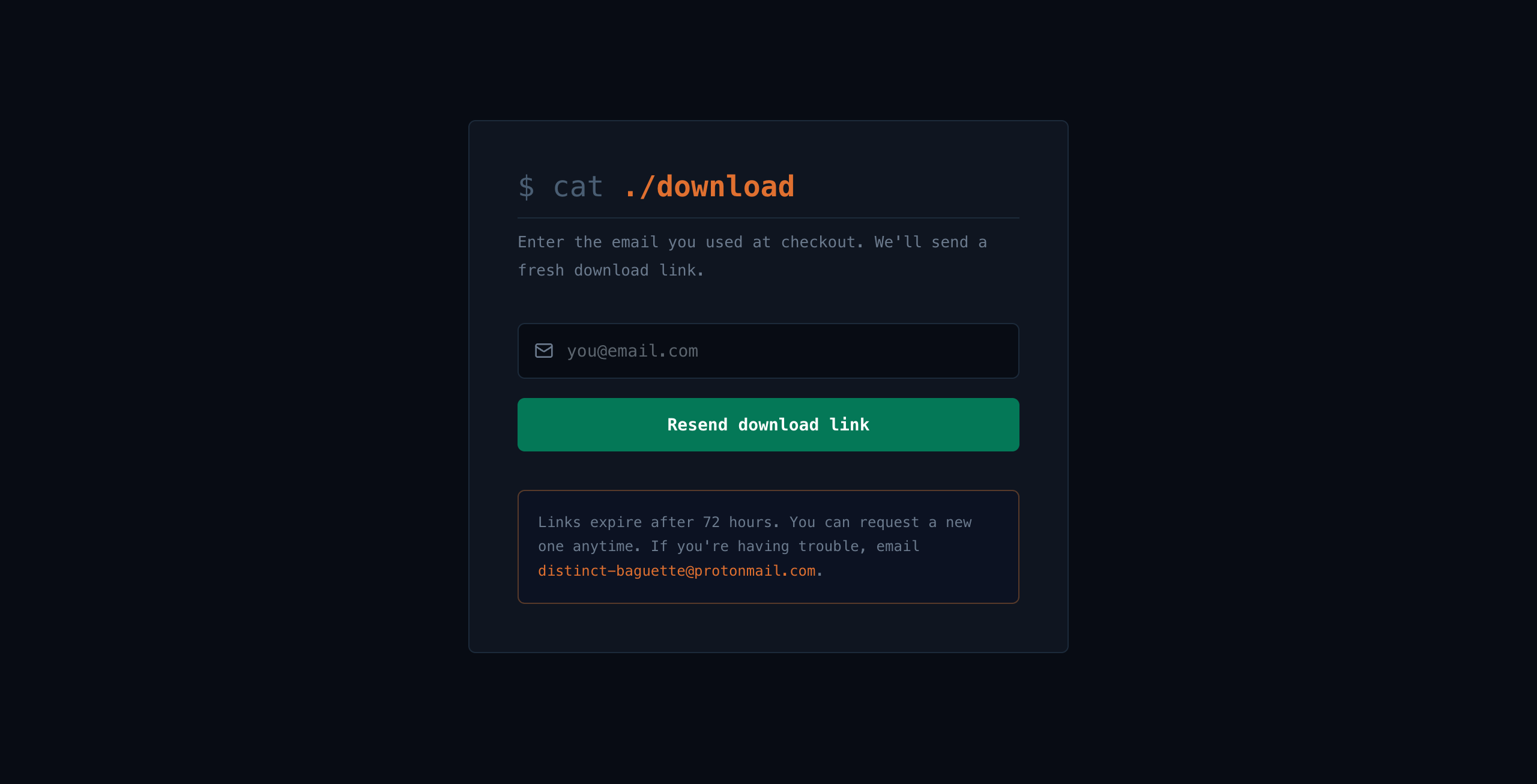
After payment confirms, you'll receive an email with a download link for the complete bot package. The link expires in 72 hours — if you need a new one, visit the download page to request a fresh link:
📦 Package Contents
• Full Rust source code
• 6.8 GB historical market data (11,201 files)
• Pre-tuned configs for BTC, ETH, SOL, XRP
• Deployment toolkit (shell scripts + systemd template)
• Real-time local dashboard via WebSocket, documentation, unit tests
• 6.8 GB historical market data (11,201 files)
• Pre-tuned configs for BTC, ETH, SOL, XRP
• Deployment toolkit (shell scripts + systemd template)
• Real-time local dashboard via WebSocket, documentation, unit tests
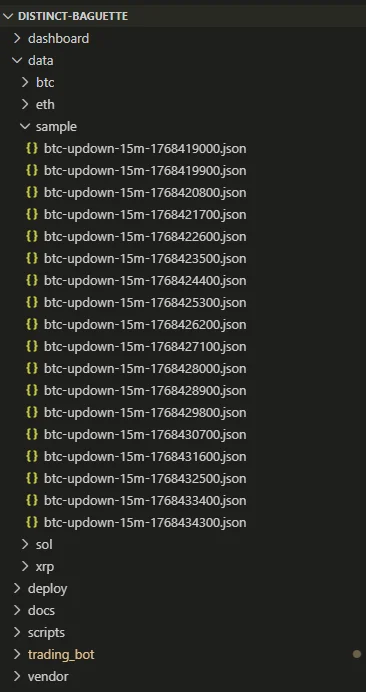
03.Explore the File Structure
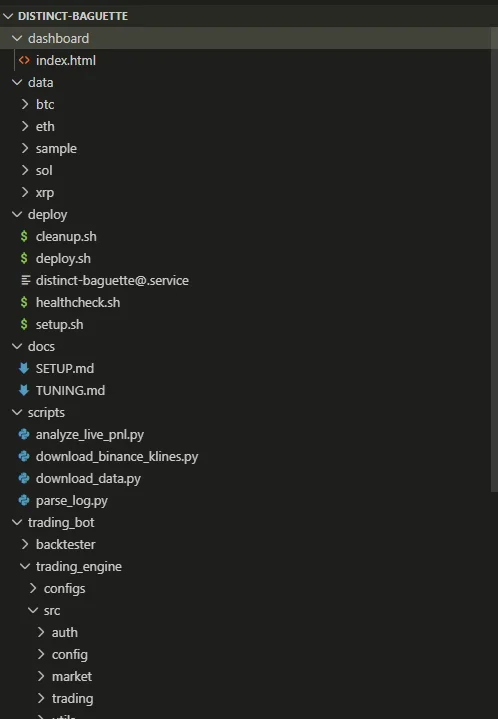
After extraction, you'll see the following project structure:
⚠️ Before You Continue
Make sure you have:
• Intermediate coding skills (Rust basics)
• VPS with low latency to Polymarket servers
• Polymarket wallet with USDC + POL for gas
• See the Setup & Deployment section for step-by-step instructions
• Intermediate coding skills (Rust basics)
• VPS with low latency to Polymarket servers
• Polymarket wallet with USDC + POL for gas
• See the Setup & Deployment section for step-by-step instructions
→ Next Steps
1. Read the Trading Strategies to understand what the bot does
2. Follow the Setup & Deployment guide to get running
3. Tune your parameters in the Parameter Tuning section
2. Follow the Setup & Deployment guide to get running
3. Tune your parameters in the Parameter Tuning section
$ cat ./trading-strategies
Last updated: Apr 2026
The bot supports three distinct strategies for Polymarket Up/Down binary options. Each can be run independently or combined across different assets and time windows. For a high-level overview, see How It Works.
01.Spread Capture (Arb)
Buys both UP and DOWN tokens simultaneously at their bid prices. Since UP + DOWN always resolves to $1.00, any combined entry below $1.00 is guaranteed profit.
Example: If UP bid = $0.48 and DOWN bid = $0.50, combined entry = $0.98. Guaranteed $0.02 profit per share regardless of outcome.
The bot monitors the spread between UP and DOWN bids and fires when the gap exceeds your configured
spread_threshold. Position rebalancing keeps both sides roughly even. Risk-neutral by design.02.Momentum
Follows short-term BTC price movements via Binance aggTrade WebSocket. When BTC ticks up, buys UP. When it ticks down, buys DOWN. The signal is based on BTC price delta over a configurable lookback window.
Execution Modes
| Mode | Description |
|---|---|
| gtc_at_ask | GTC limit order at the ask price. Recovers via maker rebate if not filled. |
| single_taker | FOK market order at the ask. Immediate fill or cancel. |
| single_maker | GTC limit order at the bid. Cheaper execution, slower fills. |
| dual_hybrid | Taker on the signal side, maker on the contra side. |
Includes configurable stop-loss, entry delay (skip volatile window opens), and burst ordering for aggressive position building. See Parameter Tuning for recommended starting configs.
03.Market Making
Two-sided quoting with automatic position rebalancing. Quotes at multiple price levels on both UP and DOWN sides, captures the bid-ask spread, and periodically merges paired positions on-chain for USDC.
Configurable levels, quote sizes, requote timing, margin thresholds, and imbalance limits. Binance preemptive cancel detects when BTC moves against your quotes and cancels before they get adversely filled.
Multi-Asset & Multi-Window
All strategies support 4 assets and 3 time windows:
BTC
ETH
SOL
XRP
5 min
15 min
1 hour
Key Features
• Event-driven evaluation -- momentum loop wakes on each Binance aggTrade with configurable cooldown
• Automatic position merging -- burns paired UP+DOWN shares on-chain for USDC
• Stop-loss protection -- sells when bid drops below avg cost by configurable percentage
• Dry-run mode -- full simulation with randomized fills, no real orders
• Graceful restart -- touch a flag file and the bot exits cleanly between windows
• Binance preemptive cancel -- cancels stale MM quotes when BTC moves against them
• Live dashboard -- real-time WebSocket monitoring of positions, signals, and fills
• Automatic position merging -- burns paired UP+DOWN shares on-chain for USDC
• Stop-loss protection -- sells when bid drops below avg cost by configurable percentage
• Dry-run mode -- full simulation with randomized fills, no real orders
• Graceful restart -- touch a flag file and the bot exits cleanly between windows
• Binance preemptive cancel -- cancels stale MM quotes when BTC moves against them
• Live dashboard -- real-time WebSocket monitoring of positions, signals, and fills
$ cat ./setup-deployment
Last updated: Apr 2026
Everything you need to go from zero to a live trading bot on a VPS.
01.Prerequisites
• Rust 1.88.0+ -- install via
• Linux VPS -- EU datacenter (Amsterdam recommended) where Polymarket and Binance are accessible
• Ethereum-compatible wallet -- with a private key (MetaMask or similar)
• USDC on Polygon -- $300-500 recommended to start trading
• POL for gas -- ~5 POL for merge transactions (~$0.01-0.05 each)
rustup.rs• Linux VPS -- EU datacenter (Amsterdam recommended) where Polymarket and Binance are accessible
• Ethereum-compatible wallet -- with a private key (MetaMask or similar)
• USDC on Polygon -- $300-500 recommended to start trading
• POL for gas -- ~5 POL for merge transactions (~$0.01-0.05 each)
02.Wallet Setup
The bot trades on Polymarket, which runs on the Polygon blockchain. You need a wallet with USDC and a small amount of POL for gas.
Create a Wallet
Install MetaMask or any Ethereum-compatible wallet. Create a new wallet and securely back up your seed phrase. Use a dedicated wallet for the bot, not your main wallet.
Fund with USDC
Three ways to get USDC on Polygon:
A. Bridge from Ethereum -- buy USDC on any exchange, withdraw to Ethereum, use the Polygon Bridge
B. Buy on Polygon directly -- Uniswap on Polygon, or exchanges with Polygon withdrawals
C. Deposit through Polymarket -- connect wallet on polymarket.com, use their deposit flow
B. Buy on Polygon directly -- Uniswap on Polygon, or exchanges with Polygon withdrawals
C. Deposit through Polymarket -- connect wallet on polymarket.com, use their deposit flow
Get POL for Gas
On-chain merge transactions require POL. Transfer ~5 POL to your wallet on Polygon. Available on most exchanges or via a POL faucet for test amounts.
Set Up Polymarket
Visit polymarket.com, connect your wallet, and complete verification. The bot derives CLOB API credentials automatically from your private key using EIP-712 signatures -- no separate API key needed.
03.Build & Configure
# Unzip and enter the project
unzip distinct-baguette.zip && cd distinct-baguette

# Create .env from template
cp .env.example .env
# Edit .env with your private key and funder address

# Build the trading bot
cd trading_bot/trading_engine
cargo build --release
Your
.env file needs two values:PRIVATE_KEY=your_private_key_here_without_0x_prefix FUNDER_ADDRESS=your_wallet_address_here
04.Dry Run
All configs ship with
dry_run: true by default. Verify the bot connects and evaluates markets before going live:./target/release/distinct-baguette --config configs/btc.json --dry-run
05.VPS Deployment
The bot runs as a systemd service on a Linux VPS. A one-shot deploy script handles everything:
# Cross-compile for Linux (from macOS)
cd trading_bot/trading_engine
cargo build --release --target x86_64-unknown-linux-gnu

# Deploy to a fresh VPS
bash deploy/setup.sh user@your-vps-ip
The deploy script creates the service account, uploads the binary + configs, sets up systemd, and starts the bot.
Deploy Scripts
| Script | Purpose |
|---|---|
| setup.sh | Full first-time setup on a fresh VPS |
| deploy.sh | Hot-swap binary update, zero-downtime restart at next window boundary |
| cleanup.sh | Complete removal (stops services, removes user, binary, configs, logs) |
| healthcheck.sh | Cron-compatible service status and log freshness check |
Network Requirements
The bot connects to the following external services during operation:
| Service | Host | Protocol | Purpose |
|---|---|---|---|
| Polymarket CLOB | clob.polymarket.com | HTTPS | Place/cancel orders, balances |
| Polymarket Market WS | ws-subscriptions-clob.polymarket.com | WSS | Real-time orderbook/prices |
| Polymarket User WS | ws-subscriptions-clob.polymarket.com | WSS | Order fills, status updates |
| Polymarket Auth | clob.polymarket.com/auth/ | HTTPS | API key derivation (EIP-712) |
| Gamma API | gamma-api.polymarket.com | HTTPS | Market metadata, token IDs |
| Polymarket Geoblock | polymarket.com | HTTPS | Geo-eligibility check |
| Binance WS | stream.binance.com:9443 | WSS | Price feed (aggTrade) |
| Polygon RPC | polygon-rpc.com (configurable) | HTTPS | On-chain merge/redeem |
Geo Restrictions
• Binance --
• Polymarket -- The CLOB API itself has no geo-block, but a geoblock check may reject US IPs for trading operations.
• Polygon RPC -- No geo restrictions. The default
stream.binance.com is blocked in the US. Users in restricted regions should run the bot from a non-US VPS.• Polymarket -- The CLOB API itself has no geo-block, but a geoblock check may reject US IPs for trading operations.
• Polygon RPC -- No geo restrictions. The default
polygon-rpc.com can be slow under load — you can swap to Alchemy, Infura, or QuickNode in your config file (rpc_url field).VPS Recommendations
The latency-sensitive connections are the three WebSocket feeds (Polymarket market, Polymarket user, Binance). Polymarket's CLOB is behind Cloudflare with major PoPs in Amsterdam and Frankfurt.
| Provider | Region | Notes |
|---|---|---|
| DigitalOcean AMS3 | Amsterdam | ~1ms to CLOB, tested and recommended |
| Vultr Amsterdam | Amsterdam | Good alternative to DigitalOcean |
| AWS eu-west-1 | Ireland | Reliable, slightly higher latency |
A $6-12/mo VPS (1 vCPU, 1GB RAM) is sufficient. The bot binary is ~11MB and uses minimal resources.
06.Cross-Compilation
The bot targets Linux x86_64 for VPS deployment. You can cross-compile from macOS or build via WSL on Windows.
rustup target add x86_64-unknown-linux-gnu
brew install filosottile/musl-cross/musl-cross

CARGO_TARGET_X86_64_UNKNOWN_LINUX_GNU_LINKER=x86_64-linux-musl-gcc \
  cargo build --release --target x86_64-unknown-linux-gnu
07.Troubleshooting
| Issue | Fix |
|---|---|
| "Invalid API key" | Remove 0x prefix from private key, ensure 64 hex chars |
| "Insufficient balance" | Deposit more USDC on Polygon |
| Merge transactions fail | Send POL to your wallet on Polygon |
| Bot connects but no trades | Set "dry_run": false in config |
| ICE (compiler error) | Try: RUSTFLAGS='-Awarnings' cargo build --release |
$ cat ./configuration
Last updated: Apr 2026
All parameters are optional with sensible defaults. Create a JSON file and pass via
--config. The package includes pre-tuned configs for BTC, ETH, SOL, and XRP.General Parameters
| Parameter | Default | Description |
|---|---|---|
| symbol | btc | Asset to trade: btc, eth, sol, xrp |
| strategy | arb | Strategy: arb, momentum, or mm |
| dry_run | false | Simulate without placing real orders |
| window | 15m | Market window: 5m, 15m, 1h |
| current_market | false | Trade current window instead of next |
| min_price | 0.0 | Only trade above this price |
| max_price | 1.0 | Only trade below this price |
| stop_before_end_ms | 0 | Stop trading N ms before window end |
| web_port | 0 | Dashboard WebSocket port (0 = disabled) |
Arb Parameters
| Parameter | Default | Description |
|---|---|---|
| max_buy_order_size | 5.0 | Shares per order |
| spread_threshold | 0.02 | Min spread to trigger ($) |
| trade_cooldown | 5000 | Cancel unfilled orders after (ms) |
| balance_factor | 0.0 | Position rebalancing aggressiveness (0-1) |
| price_bias | 0.0 | Bid bump per share of imbalance |
Momentum Parameters
| Parameter | Default | Description |
|---|---|---|
| momentum_size | 10 | Shares per directional buy |
| momentum_mode | single_taker | Execution mode (gtc_at_ask, single_taker, single_maker, dual_hybrid) |
| eval_interval_ms | 2000 | Min cooldown between evaluations (ms) |
| lookback_secs | 10 | BTC price delta lookback window |
| entry_min_delta | 0.0 | Min BTC price change to trigger (%) |
| entry_delay_secs | 13 | Skip first N seconds of each window |
| burst_count | 1 | Orders per evaluation cycle |
| burst_step | 0.01 | Price increment per burst order ($) |
| stop_loss_pct | 0.0 | Sell when bid drops this far below avg cost (0 = disabled) |
| stop_loss_keep_shares | 0.0 | Shares to retain after stop-loss |
| stop_loss_cooldown_ms | 0 | Block re-buying N ms after stop-loss |
Market Making Parameters
| Parameter | Default | Description |
|---|---|---|
| mm_levels | 1 | Quote levels per side |
| mm_size | 10 | Shares per level |
| mm_requote_ms | 500 | Requote interval (ms) |
| mm_min_margin | 0.005 | Min margin to quote |
| mm_level_step | 0.01 | Price step between levels ($) |
| mm_max_imbalance | 200 | Max position imbalance before pausing |
Merge Parameters
| Parameter | Default | Description |
|---|---|---|
| merge_interval_secs | 240 | Merge paired positions every N seconds |
| merge_fraction | 0.5 | Fraction of pairs to merge each cycle |
| merge_min_pairs | 10 | Min pairs before merging |
| polygon_rpc_url | https://polygon-rpc.com | Polygon RPC endpoint |
Example Config
{
  "symbol": "btc",
  "strategy": "momentum",
  "window": "15m",
  "dry_run": true,
  "momentum_size": 10,
  "momentum_mode": "gtc_at_ask",
  "lookback_secs": 2,
  "entry_min_delta": 0.02,
  "eval_interval_ms": 1000,
  "entry_delay_secs": 8,
  "merge_interval_secs": 240,
  "merge_fraction": 0.5,
  "web_port": 3001
}
$ cat ./parameter-tuning
Last updated: Apr 2026
How the parameters interact, recommended starting points, and how to use the backtester to find optimal settings.
Momentum Tuning
The key parameters and how they interact:
• Shorter
• Higher
•
lookback_secs produces higher ROI but fewer trades per window• Higher
entry_min_delta improves quality but reduces volume•
eval_interval_ms acts as a rate limiter — 1000ms is typically the sweet spotConservative (15-min windows)
{
  "lookback_secs": 2,
  "entry_min_delta": 0.02,
  "eval_interval_ms": 1000,
  "momentum_mode": "gtc_at_ask",
  "entry_delay_secs": 8,
  "burst_count": 1
}
Aggressive (15-min windows)
{
  "lookback_secs": 1,
  "entry_min_delta": 0.01,
  "eval_interval_ms": 1000,
  "momentum_mode": "gtc_at_ask",
  "entry_delay_secs": 5,
  "burst_count": 3,
  "burst_step": 0.01
}
Window-specific tips: 5-min windows need shorter entry delay (3-5s) and faster merge (60s). 1-hour windows use longer entry delay (15s) and slower merge (300s).
Market Making Tuning
• More
• Higher
• Faster
mm_levels is the #1 defense against adverse selection• Higher
mm_min_margin protects against stale fills• Faster
mm_requote_ms reduces stale quote exposure but increases cancel rateConservative
{
  "mm_levels": 2,
  "mm_size": 10,
  "mm_level_step": 0.01,
  "mm_requote_ms": 500,
  "mm_min_margin": 0.02,
  "mm_max_imbalance": 100
}
Aggressive
{
  "mm_levels": 3,
  "mm_size": 15,
  "mm_level_step": 0.01,
  "mm_requote_ms": 250,
  "mm_min_margin": 0.005,
  "mm_max_imbalance": 200
}
Merge Tuning
• Shorter windows (5m) need faster merges (
•
• Set
60s) to realize profits before window end•
merge_fraction: 0.5 is a good default — merges half each cycle, smoothing gas costs• Set
merge_min_pairs: 10 to avoid paying gas for tiny mergesBacktester Sweeps
Use the backtester to sweep parameters before deploying changes:
Basic sweep
for lb in 1 2 3 5; do
  echo "=== lookback=$lb ==="
  ./target/release/backtester \
    --folder ../../data/sample \
    --strategy momentum \
    --lookback $lb \
    --entry-min-delta 0.0001 \
    --eval-interval 1000 \
    --orderbook-lag 200
done
Multi-parameter sweep
for lb in 1 2 3; do
  for delta in 0.0001 0.0002 0.0005; do
    echo "=== lookback=$lb delta=$delta ==="
    ./target/release/backtester \
      --folder ../../data/sample \
      --strategy momentum \
      --lookback $lb \
      --entry-min-delta $delta \
      --eval-interval 1000 \
      --orderbook-lag 200 2>&1 | grep -E "^(Worst|ROI)"
  done
done
Interpreting Results
| Metric | What It Means |
|---|---|
| Worst-case P&L | Sum of all market P&Ls (assumes every market is traded). Most conservative. |
| ROI | Worst-case P&L / total capital deployed. Higher = better capital efficiency. |
| Median P&L | Median per-market P&L. More representative of typical performance. |
| Both-profitable % | Percentage of markets where both sides are profitable. |
| Imbalance | Avg end-of-window position imbalance. Lower = less unhedged risk. |
General Tips
1. Start with dry run. All shipped configs have dry_run: true. Verify before trading real money.
2. Start conservative. Use conservative presets above, then tune based on backtester + live results.
3. Backtest before deploying. Run the backtester on 3-4 days of data before changing live parameters.
4. Monitor position imbalance. Large imbalances mean the merge couldn't pair all shares. Consider faster merge intervals or smaller sizes.
5. VPS location matters. Amsterdam/Frankfurt gives sub-2ms latency to Polymarket CLOB. Avoid US — Binance WS is blocked and Polymarket geoblock rejects US IPs for trading.
6. Merge gas costs. Each merge costs ~$0.01-0.05 in POL. Factor into profitability, especially with fast merge intervals.
2. Start conservative. Use conservative presets above, then tune based on backtester + live results.
3. Backtest before deploying. Run the backtester on 3-4 days of data before changing live parameters.
4. Monitor position imbalance. Large imbalances mean the merge couldn't pair all shares. Consider faster merge intervals or smaller sizes.
5. VPS location matters. Amsterdam/Frankfurt gives sub-2ms latency to Polymarket CLOB. Avoid US — Binance WS is blocked and Polymarket geoblock rejects US IPs for trading.
6. Merge gas costs. Each merge costs ~$0.01-0.05 in POL. Factor into profitability, especially with fast merge intervals.
$ cat ./dashboard
Last updated: Apr 2026
The bot includes a WebSocket-based dashboard for real-time monitoring. Enable it by setting
web_port in your config.01.Enable the Dashboard
{
  "web_port": 3001
}
Open
dashboard/index.html in a browser and connect to ws://localhost:3001.02.What the Dashboard Shows
| Panel | Data |
|---|---|
| Position | Live UP/DOWN share counts, cost basis, realized P&L |
| Market | Current bid/ask for both sides |
| Signal | Momentum delta, BTC price, direction, action (trade/skip/rest) |
| Orders | Placed orders with price, size, and fill status |
| Merges | On-chain merge events with shares merged |
| Config | Active strategy parameters |
03.SSH Tunnel (Remote Access)
The WebSocket server binds to localhost only for security. To access from your local machine:
ssh -L 3001:localhost:3001 user@your-vps-ip
Then open the dashboard and connect to
ws://localhost:3001.04.Data File Commands
The dashboard also supports data file management via WebSocket commands:
| Command | Description |
|---|---|
| {"cmd": "list_data"} | List recorded data files |
| {"cmd": "fetch_all"} | Download all data files |
| {"cmd": "delete_all"} | Delete all data files |
| {"cmd": "fetch_and_delete"} | Download and delete data files |
05.Log Analysis
Two Python scripts are included for analyzing bot logs:
# Parse bot logs for order/fill patterns
cat /var/log/distinct-baguette/btc.log | python scripts/parse_log.py

# P&L analysis from live logs
python scripts/analyze_live_pnl.py /var/log/distinct-baguette/btc.log
$ cat ./backtesting
Last updated: Apr 2026
The package includes a full backtester with parallel processing (rayon), 3 fill models (deterministic, probabilistic, latency), and 6.8 GB of historical market data across BTC, ETH, SOL, and XRP.
📂 Market History Data
All historical market data is located in:
data/| Directory | Markets | Size | Period |
|---|---|---|---|
| data/sample/ | 18 | 22 MB | Jan 14 |
| data/btc/ | 3,078 | 2.4 GB | Dec 20 - Feb 17 |
| data/eth/ | 1,957 | 1.3 GB | Dec 20 - Feb 17 |
| data/sol/ | 1,964 | 1.0 GB | Dec 20 - Feb 17 |
| data/xrp/ | 1,967 | 929 MB | Dec 20 - Feb 17 |
📊 Data Features
• 11,201 market files across BTC, ETH, SOL, XRP
• Full orderbook tick history (bid/ask/mid for UP and DOWN)
• Embedded Binance 1-second klines for momentum replay
• Downsampled to 100ms — preserves every price change
• 6.8 GB total (Dec 2025 through Feb 2026)
• Full orderbook tick history (bid/ask/mid for UP and DOWN)
• Embedded Binance 1-second klines for momentum replay
• Downsampled to 100ms — preserves every price change
• 6.8 GB total (Dec 2025 through Feb 2026)
🔧 Backtester
The Rust backtester processes thousands of markets in minutes via parallel processing (rayon) across markets. It simulates all 3 strategies with the same parameters as live trading. You select one fill model per run — deterministic, probabilistic, or latency — and run the backtester separately for each model to compare results.
Backtester CLI
| Flag | Default | Description |
|---|---|---|
| --folder | data/sample | Directory with market JSON files |
| --strategy | arb | Strategy: arb, momentum, mm |
| --orderbook-lag | 0 | Simulated execution latency (ms) |
| --klines | External klines.jsonl file path | |
| --start-ts / --end-ts | Unix timestamp filters | |
| --lookback | 10 | BTC price lookback (seconds) |
| --entry-min-delta | 0.0 | Min BTC delta to trigger (decimal %) |
| --eval-interval | 2000 | Evaluation interval (ms) |
| --spread | 0.02 | Spread threshold for arb ($) |
| --mm-levels | 1 | MM quote levels per side |
| --mm-size | 10 | MM shares per level |
| --mm-requote | 500 | MM requote interval (ms) |
| --mm-fill-model | deterministic | Fill model: deterministic, probabilistic, latency |
| --mm-fill-prob | 0.20 | Fill probability (probabilistic/latency model) |
| --mm-latency | 200 | Cancel-replace latency (ms, latency model) |
# Momentum strategy on sample data
./target/release/backtester \
  --folder ../../data/sample \
  --strategy momentum \
  --lookback 2 \
  --entry-min-delta 0.0001 \
  --eval-interval 1000 \
  --orderbook-lag 200

# Market-making strategy
./target/release/backtester \
  --folder ../../data/sample \
  --strategy mm \
  --mm-levels 2 \
  --mm-size 10 \
  --mm-requote 500 \
  --mm-fill-model latency \
  --mm-latency 100

# Arb (spread capture) strategy
./target/release/backtester \
  --folder ../../data/sample \
  --strategy arb \
  --spread 0.02 \
  --orderbook-lag 200
Download More Data
A Python script downloads additional data from a public HuggingFace dataset:
# List available dates
python scripts/download_data.py --list-dates

# Download one day
python scripts/download_data.py --date 2026-01-16

# Download everything
python scripts/download_data.py --all
📈 Backtesting Output Examples
The backtesting scripts generate comprehensive performance metrics:
Loading chart...
Loading heatmap...
Loading chart...
Sample Results
8 days of BTC data (Jan 14-21, 2026) at 200ms simulated latency:
| Strategy | Config | P&L | ROI |
|---|---|---|---|
| Momentum | lookback=2s, delta=0.01%, eval=1000ms | +$7,086 | +4.61% |
| Momentum | lookback=3s, delta=0.01%, eval=1000ms | +$6,706 | +2.96% |
| MM | 2 levels, $0.01 step, prob fill model | +$34,000 | +0.86% |
| MM + Cancel | threshold=0.005%, lookback=1s | +$89 median/mkt | +32% vs baseline |
⚠️ Critical: Backtesting Limitations
Backtesting is NEVER as accurate as live trading.
However, because I have scraped high-accuracy order book and price logs, you can definitely use this data to:
• Test different trading strategies
• Filter out strategies that won't work
• Avoid burning money on live testing
• Tune parameters before going live
• Filter out strategies that won't work
• Avoid burning money on live testing
• Tune parameters before going live
💡 Real-World Impact
Every config shipped in this package was validated against the backtester before going live. Parameters that looked good on paper but bled money in simulation were caught and killed before they cost real capital.
The 100ms-resolution data lets you replay exact market conditions — spreads, orderbook depth, Binance price movements — and see how your parameter changes would have played out across 11,201 historical markets.
$ cat ./changelog
Version history. Re-download anytime to get the latest build.
Trading Engine
•Momentum, market-making, and arbitrage strategies for Polymarket Up/Down markets
•BTC, ETH, SOL, XRP support with per-token Binance price feeds
•GTC-at-ask and FOK execution modes
•Event-driven evaluation (wakes on each Binance aggTrade)
•On-chain merge via ProxyWallet Factory
•Configurable entry delay, lookback, min delta, burst count, eval interval
•`--version` flag
Backtester
•Full simulation of momentum, MM, and arb strategies against historical data
•Latency model for MM (deterministic, probabilistic, hybrid)
•Binance kline support for realistic price signals
•JSON output (`--json-output`) for programmatic analysis
•`--version` flag
Dashboard
•Real-time WebSocket dashboard with live price, position, and P&L display
•Chart.js visualizations (vendored, no CDN dependency)
•Quick-connect buttons for multi-token switching
•Countdown timer, signal strength indicator
Data
•BTC, ETH, SOL, XRP market data (Dec 2025 – Feb 2026)
•Binance klines for backtesting
Pre-release History
Full source code, data, configs, and deployment scripts.